
Amazon Seller Reporting Is No Longer a Tedious Excel Activity
Seller Central provides important information. However, the real challenge is to interpret this data and gather actionable insights from it.
EcomDune is Amazon seller reporting software for those with live products. The tool brings together sales, SKU-level profit, ad spend, and keyword rank in one platform, reducing the reporting work of exporting and stitching data manually.
It is suited for brand owners and private-label sellers, primarily in the US, Canada, and India.
Amazon Seller Reports That Address Real Questions
The data behind Amazon seller reports comes from different places. Orders can be tracked in Seller Central, payments in another place, and advertising in Amazon Ads. Each report comes with a unique set of dates, filters, and file formats.
This setup makes it difficult to answer a fundamental question: “Did the product make a profit last week?”
Thanks to EcomDune, you can now see key metrics in one Amazon reporting tool. Instead of checking several reports, you can see how revenue, refunds, ad costs, and product costs connect to each other.
While a sales increase looks great, it might not be so great if profit goes down. An increase in the number of refunds, storage fees, or high advertising spend can quickly change the situation.
Tracking Amazon Sales: More Than Just Revenue
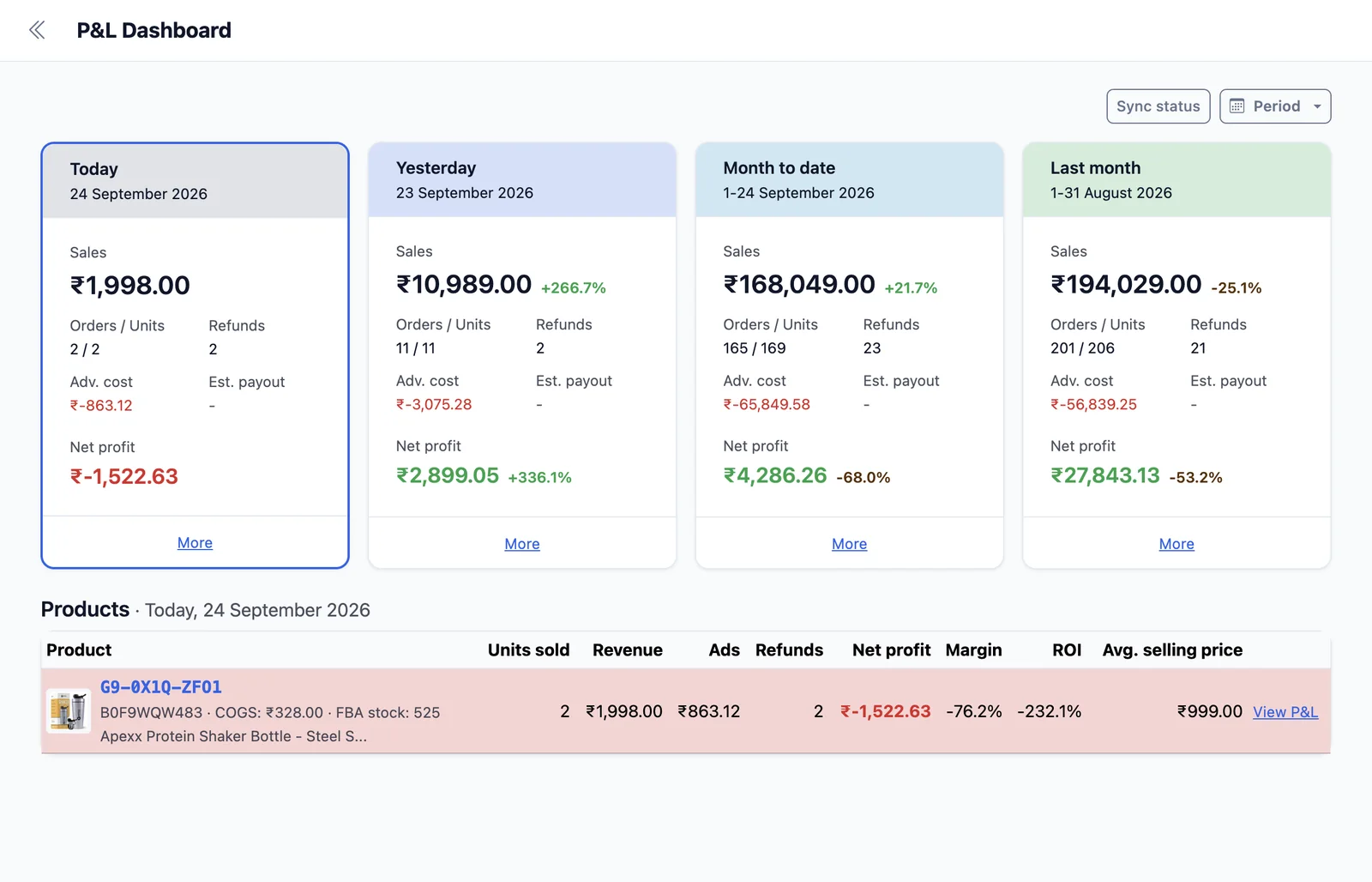
A regular Amazon sales report only tells you how much money customers have spent. It doesn't always explain what's left after subtracting the expenses related to selling a product.
EcomDune combines sales figures with the expenses you input for each product. You can check reports by order, SKU and marketplace to see how sales translate into profit.
You can find out what's going on with:
While revenue is good, profit lets you evaluate whether your sales have been worth making.
Refunds can change the picture after an order is received. When refunds and sales appear in one profitability report, you can reduce the risk of making decisions from incomplete data.
Sales Data for Amazon Products by SKU
It is possible for two different products to sell identical numbers of units, but still yield very different results.
A product with a specific SKU may have a higher referral cost or higher fulfilment fee. It may also see more returns than another product. Another SKU may have higher advertising expenditure, leading to a lower profit margin. But using unit sales alone would not identify the cause of the difference.
EcomDune connects Amazon sales to product costs, fulfilment costs, refunds, and advertising spend.
As a result, it becomes possible to conduct weekly analyses of SKUs to identify those with decent sales but poor margins.
For Indian sellers, product-cost reporting can include GST treatment where applicable, helping profit calculations take taxes into consideration.
Monitor Amazon Sales Over Time
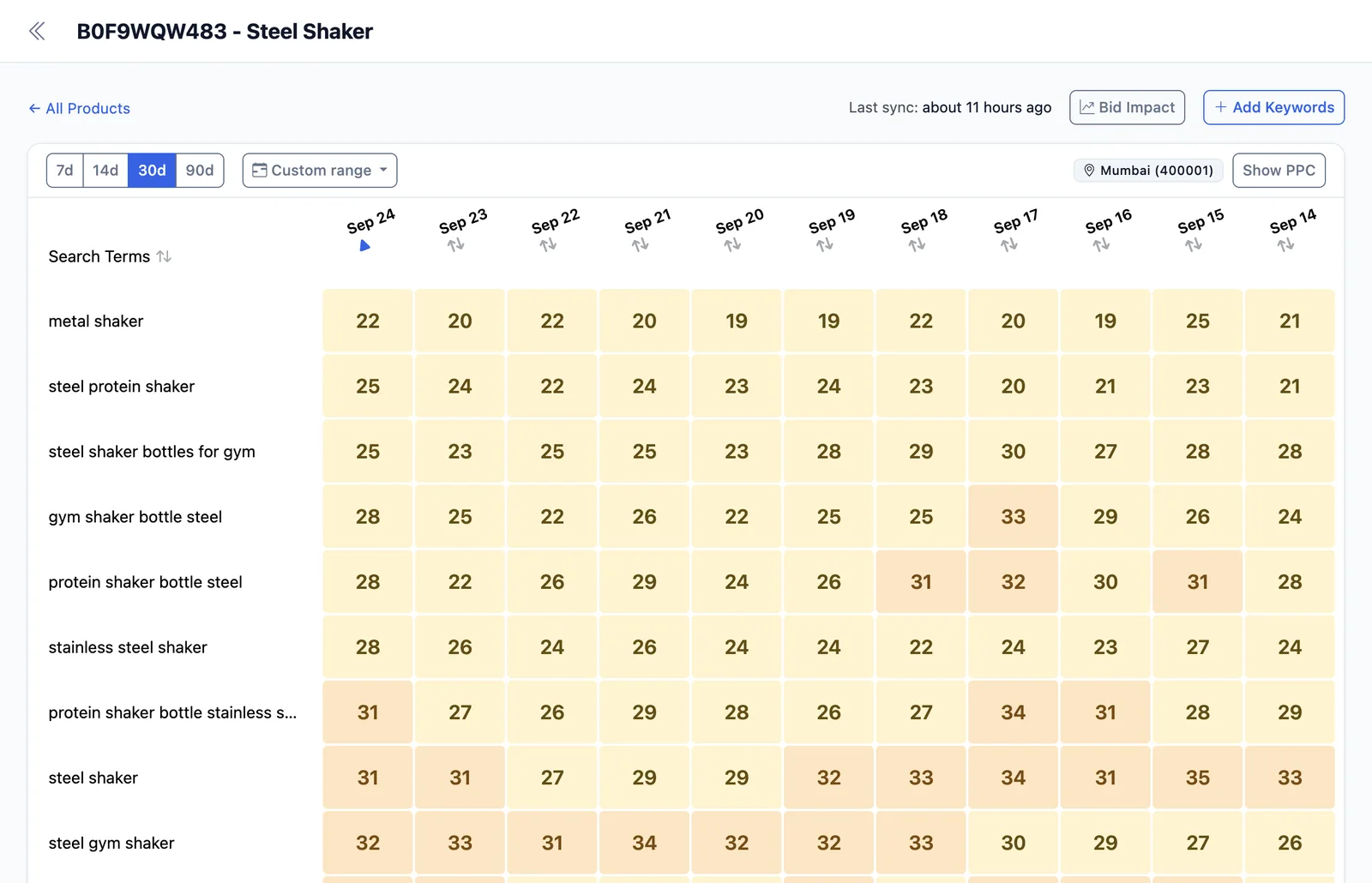
A single day can be noisy. Trends show whether a change needs attention.
EcomDune lets you compare periods, such as this week with last week or this quarter with the same quarter last year. This makes it easier to see whether sales, profit, refund rates, and ad spend are rising or falling.
Historical views are also useful when you amend listings, adjust prices, or change advertising. You can see what happened after a decision without relying on memory.
Keyword rank provides another useful signal. Visibility can decline before sales do. When you compare keyword-rank changes with sales and profit, you have a stronger starting point for investigating what changed.
Find out more about tracking ranks with EcomDune's Amazon keyword rank tracker.
How the Amazon Seller Reporting Tool Works
Connect your Seller Central and Amazon Ads accounts, then add the product costs you want included in your reports.
Once your data appears in the dashboard, you can review profit by SKU, sales trends, advertising results, and tracked keyword performance. Start with the SKU that changed the most, then check its sales, costs, ads, and keyword visibility to find out why.
EcomDune is built for analysis. It helps you understand your numbers and spot where action may be needed. You stay in control of every decision.
No credit card needed.
FAQs
No. Seller Central is where you manage listings, inventory, account settings, and day-to-day selling activity. EcomDune lets you comprehend the reporting data behind your business.
You can review total sales, profit by product, Amazon fees, refunds, advertising spend, product costs, and keyword performance, based on the accounts and data you connect.
Yes. SKU-level reports empower you to compare sales, costs, and profit across products in your catalogue.
If your EcomDune plan supports multiple accounts, you can review performance across those accounts in one place.
No. EcomDune is for reporting and analysis. It does not change bids, budgets, or ad campaigns.
See What Your Sales Actually Kept
Revenue shows what came in. Profit shows what was left after costs. Use EcomDune to bring your Amazon seller reports into one daily view you can act on.
Start your 14-day free trial