
Profit Analytics for Amazon: Discover How Margins Are Lost
Your bestseller broke its sales record, but the payout came in lower than expected. EcomDune is Amazon seller analytics software that shows profit per product after ads, Amazon fees, product costs, and other expenses.
EcomDune: Amazon Seller Analytics Made Simpler
Revenue is easy to monitor because it is a single total. Profit is more complicated because it depends on multiple costs.
Amazon fees reduce the amount you keep from a sale. Advertising costs can reduce it further. Product costs, returns, and other expenses can also affect the final amount.
With EcomDune, you can see the profit generated by each product instead of judging performance by revenue alone.
What Amazon Profit Tracking Software Reveals While Revenue Conceals
Strong revenue does not always mean strong profitability. A product can continue selling well while its margin becomes thinner as costs change.
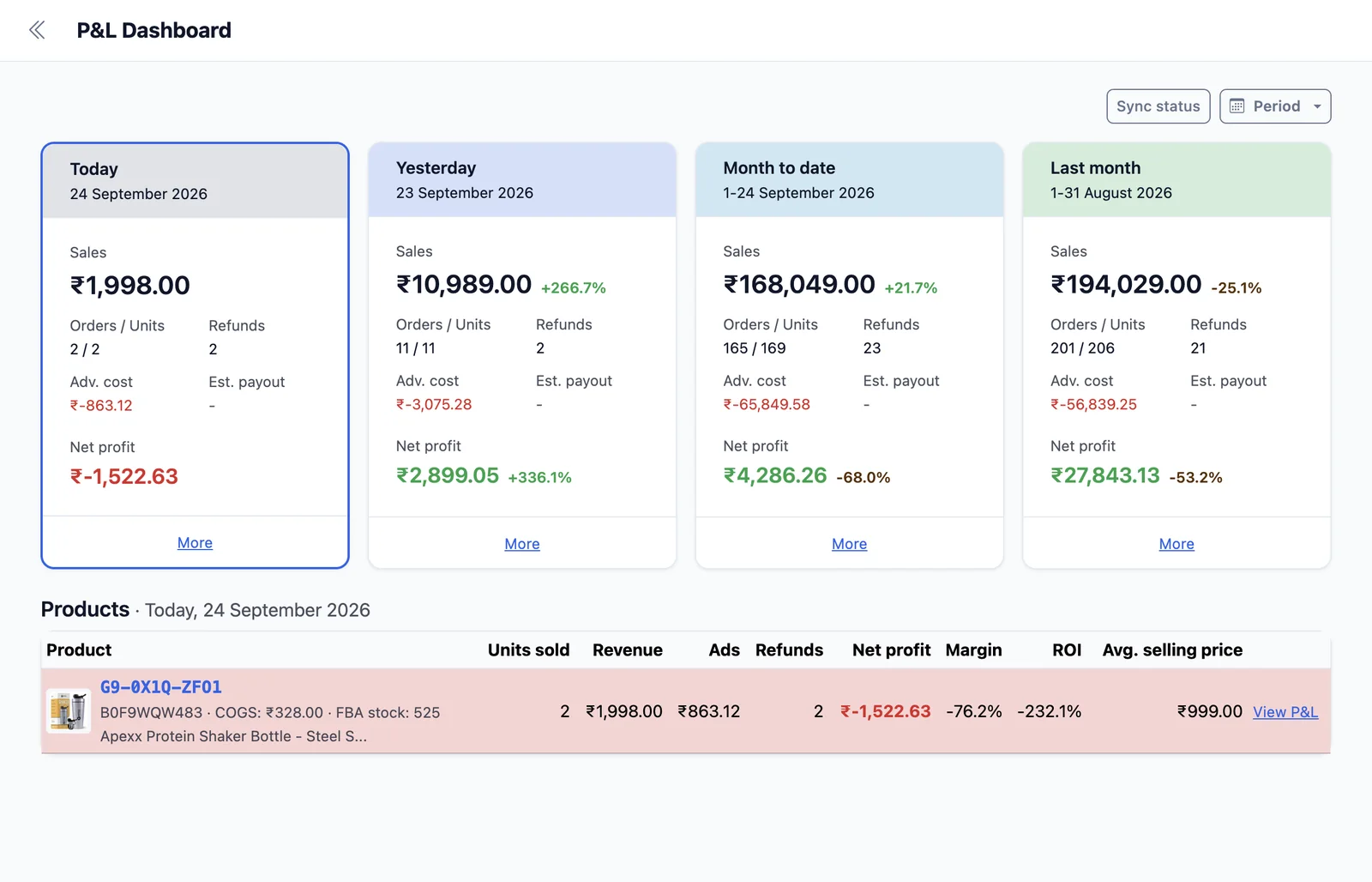
Advertising costs may increase. Amazon fees may change. Product costs can rise after a supplier change. Returns and other expenses can also affect what remains from each sale. Looking at these factors together gives you a clearer view of how changes in costs affect individual products and where profitability may be under pressure.
How to Identify Profit by Product in Three Steps
What You Can Do With EcomDune's Amazon Profit Tracker
1. Compare Products by Profit
Sales volume does not tell you how much money each product actually leaves after costs. Compare products by the profit they generate to understand which ones are contributing more to your bottom line.
Use these product-level insights to decide which products deserve a closer review.
2. Evaluate Advertising Spend Against Product Profit
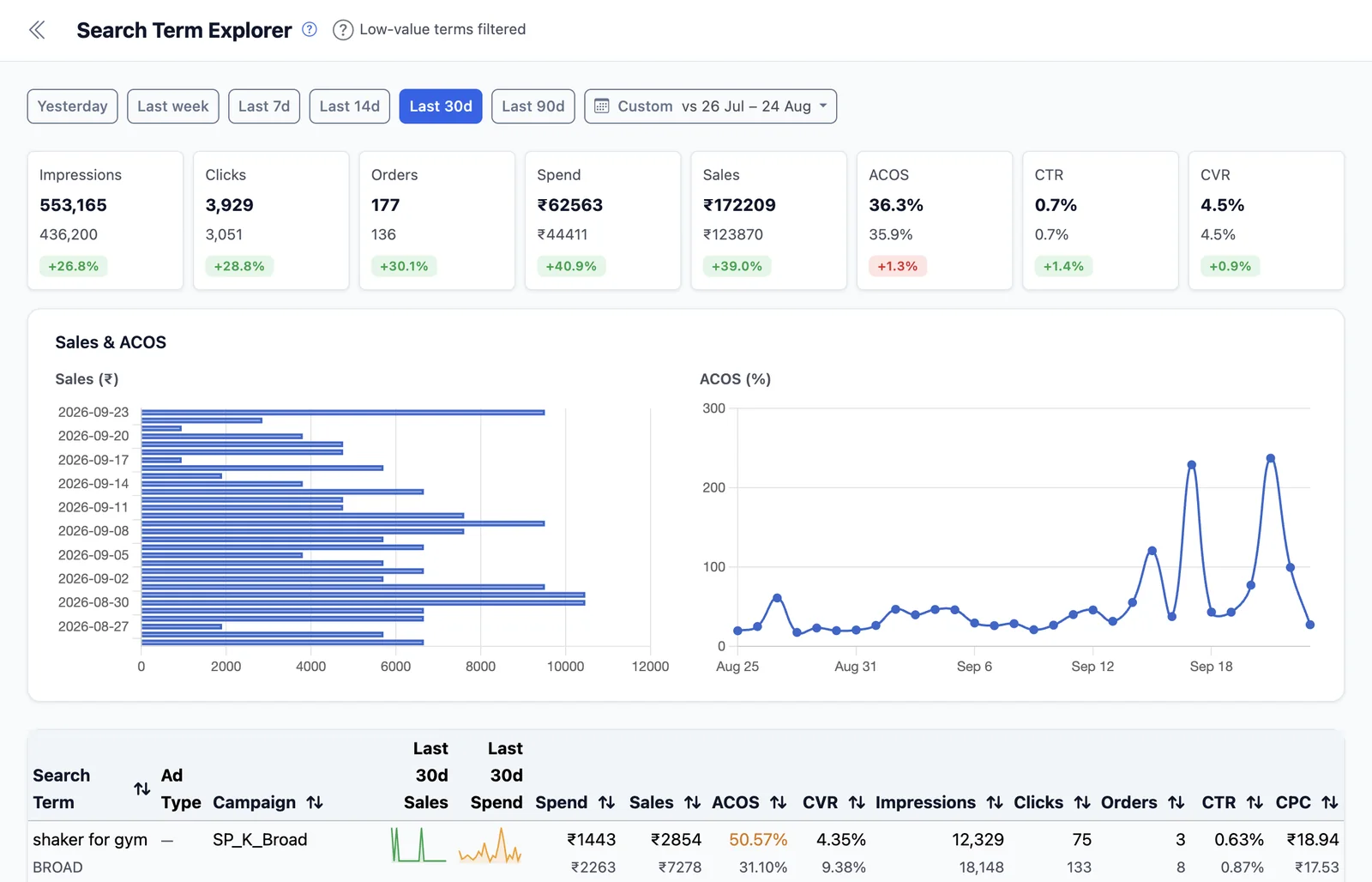
Advertising can generate sales while still reducing the profit left from a product. ACoS shows advertising spend relative to the sales it generated, but it does not show the product's final profit.
Compare advertising spend with product-level profit to understand how ad costs affect profitability.
3. Review the Impact of Product Costs
Changes in product costs can affect your margin even when your selling price and sales volume remain unchanged.
Review product-level profit alongside your costs to understand whether a product remains profitable as its expenses change.
Conduct a Monthly Margin Leak Review
A monthly review is beneficial because it helps you identify what has changed before those changes develop into major problems.
Some questions to ask include:
- What are the top three products in terms of profit earned?
- Which products have steady sales but almost no profit?
- Which products show a decline in profitability compared with the previous period?
- Have there been any changes in price, advertising, Amazon fees, or product costs compared with the prior period?
- Are you using the correct supplier data to determine your cost of goods?
- If you were judging based on profit instead of sales, would you order the same products in the same quantities?
Repeat the review after any major price, advertising, or supplier change.
When planning a new product, it is best to first use the Amazon FBA profit calculator and Amazon fee calculator to create your projections, then compare your expectations with the actual data after launch.
Amazon Seller Accounting Software Compared: Spreadsheets, Sellerboard, Nova Data, KwickMetrics and EcomDune
| Alternative | Distinctive Features | Great Fit For |
|---|---|---|
| Spreadsheets | You can start using spreadsheets without much investment. You will have to export data from your marketplace, merge reports, enter costs, and apply your own formulas. | Those with a small product range who can spare time for manual calculations. |
| Sellerboard | A profit dashboard displaying sales, refunds, advertising expenses, Amazon fees, product costs, and other expenses. It also offers features such as FIFO COGS tracking and inventory tools. | Those who want profit analytics as well as inventory tracking. |
| Nova Data | Amazon P&L reports by product, including marketplace fees, advertising spend, COGS, and other costs. The system refreshes data hourly across multiple accounts and Amazon marketplaces. | Sellers and teams that want automated, frequently updated P&L reporting. |
| KwickMetrics | Reports on sales and product costs, including advertising costs, across both Amazon and Walmart. | Those who want to track profitability across Amazon and Walmart in one place. |
| EcomDune | Connect Amazon and advertising data, add relevant business costs, and analyze profitability at the product level. | Sellers looking for a structured way to turn multiple data sources into product-level profitability insights. |
Capabilities, supported marketplaces, integrations, and offers are subject to change, so check each provider's current product page before purchasing. To learn more about another option, see our Sellerboard alternatives page.
EcomDune's Profit Numbers Explained
Profit figures may change as Amazon updates or adjusts financial data after a sale, so even recent results may not always be final.
Avoid making decisions based on a single day's profit. Alternatively, review profitability trends over a longer period and investigate products with noticeable changes before deciding what action to take.
Common Questions
To calculate profit on Amazon, take the total revenue and subtract all costs associated with the product, such as Amazon fees, cost of goods, and advertising expenses. Refund-related costs may also affect the calculation.
The answer depends on your requirements. Several tools can be used for profit analysis on Amazon, such as Sellerboard, Nova Data, KwickMetrics, and EcomDune, each offering different capabilities. If the business is small, reporting can be done manually with spreadsheets.
This happens because different tools may calculate or present profit using different parameters. For example, EcomDune and Seller Central may use different product or advertising cost data, which can result in different profit figures.
Detect the Leak Before Your Next Order
Your next purchase order should be based on more than sales figures. You should determine what a product makes after all your business costs. Then you can use this information to decide what to reorder, what to look into, and where your advertising needs improvement.
Try EcomDune Free for 14 Days