
Amazon Seller Dashboard: Profits, Rankings and Ads
EcomDune goes beyond sales data. Our Amazon seller dashboard shows what remains after advertising, Amazon fees, refunds and product costs.
It brings per-SKU profitability, organic keyword rank, indexing status and PPC results together for brand owners and private-label sellers with live products on Amazon US and India. See which products earn money and which need closer attention.
EcomDune reads your advertising data without changing bids, budgets or campaigns.
Your Business in One View, Not Another Spreadsheet
A strong sales month can hide a losing product. With EcomDune's Amazon seller analytics software, review your margins alongside advertising results and search visibility instead of piecing together separate reports.
KPIs Every Amazon Seller Should Track
The key performance indicators Amazon sellers monitor should answer these questions: what generates profit, how much advertising costs, and whether shoppers can find the listing. These Amazon KPIs help you identify what needs attention. Read each measure alongside related data before deciding what to investigate.
| KPI | What it tells you | What to analyse next |
|---|---|---|
| Net profit per SKU | What remains after recorded product costs, fees, advertising and refunds | Products with strong sales but low profitability |
| Net margin | The percentage of revenue remaining as profit | Margin changes between comparable periods |
| Fees and refunds | How these deductions affect earnings | Whether either takes a larger share of revenue |
| Ad spend and ACoS | Total advertising spend, and that spend as a percentage of attributed sales | PPC results alongside the product's margin |
| TACoS | Total advertising spend as a percentage of total sales, both ad-attributed and organic | Whether ad spend is growing faster than overall sales |
| PPC conversion rate | The percentage of ad clicks that result in attributed purchases | Keywords receiving clicks but converting poorly |
| Ad impressions | The number of times an ad appears | Changes in paid visibility |
| Organic keyword rank | A product's organic search position for a tracked keyword | Position changes over time, including after listing or advertising changes |
| Indexing status | Whether Amazon indexes the listing for a selected keyword | Relevant keywords for which the listing is not indexed |
ACoS measures advertising spend relative to attributed sales; it does not measure net profit. TACoS widens the view by comparing the same spend with total sales, so you can see whether advertising is carrying the business or supporting organic sales. Similarly, PPC conversion rate measures purchases relative to clicks, instead of a raw count of purchases.
An Amazon KPI becomes more useful when compared with another measure. Higher sales alongside lower profit deserve a closer cost review. More ad impressions without more purchases call for an investigation into what happens between visibility, clicks and orders.
Consider a product that sells for $30. In this example, fees total $9, product cost is $8, advertising costs $6 per unit sold, and refunds average $1.50 per unit. That leaves $5.50 in profit, a margin of about 18%. If advertising costs rise by $2 per unit and everything else stays unchanged, profit falls to $3.50, or about 12%.
The seller metrics Amazon provides are a starting point. Adding your own product costs makes these more useful for assessing profitability.
Amazon Seller Analytics for the Questions Behind the Numbers
Which SKU needs attention? Has a keyword lost visibility? What changed between two months? EcomDune's Amazon analytics software connects these questions to your P&L, keyword history and advertising results.
Amazon Sales Analytics, Down to the Order
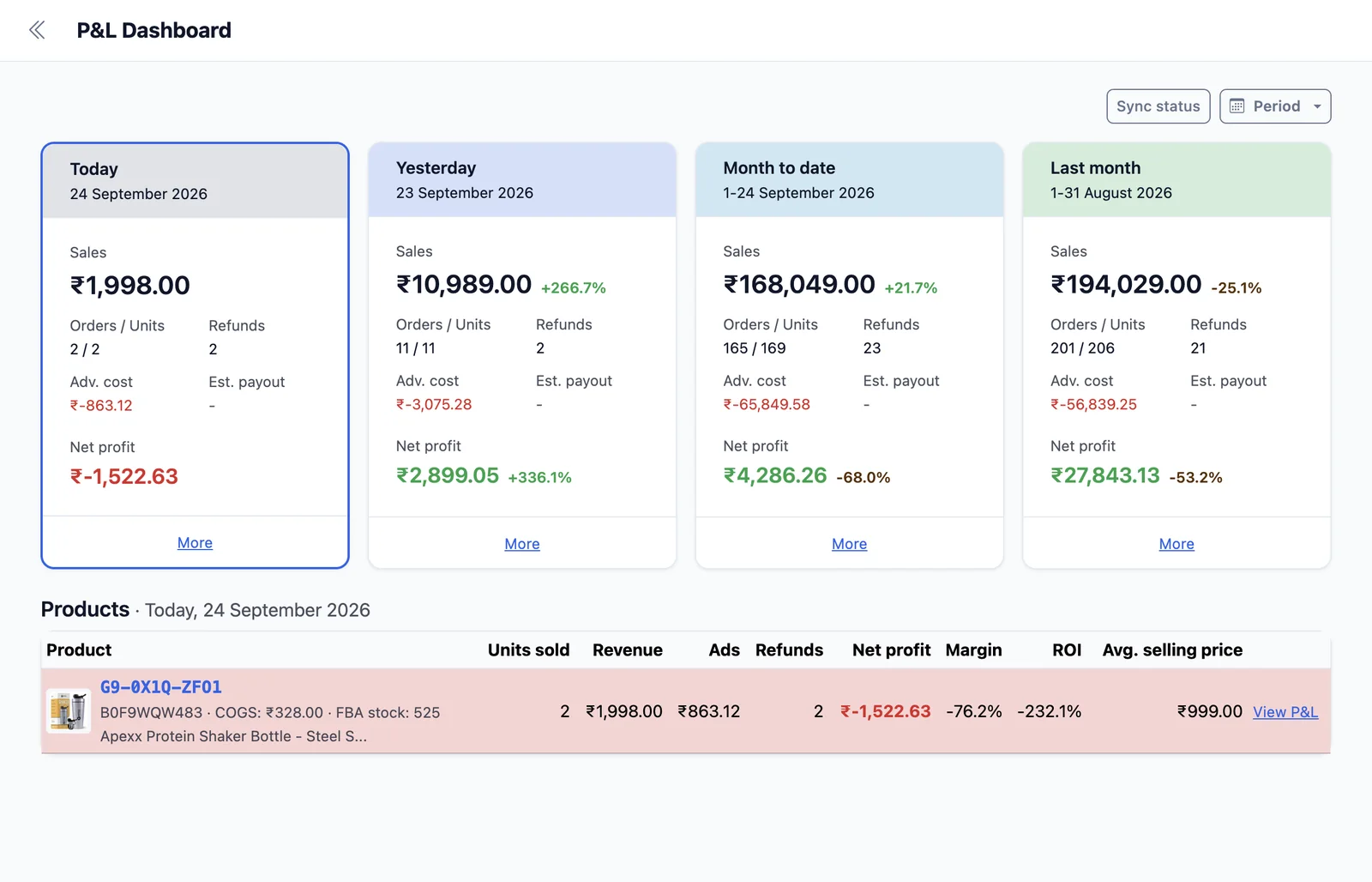
Start with what each product contributes to profit. EcomDune calculates P&L by subtracting Amazon fees, ad spend, refunds and your supplied product costs from sales. View the results by order, SKU and marketplace.
Upload your cost-of-goods file or import it from Sellerboard.
Amazon Product Analytics: Rank and Indexing
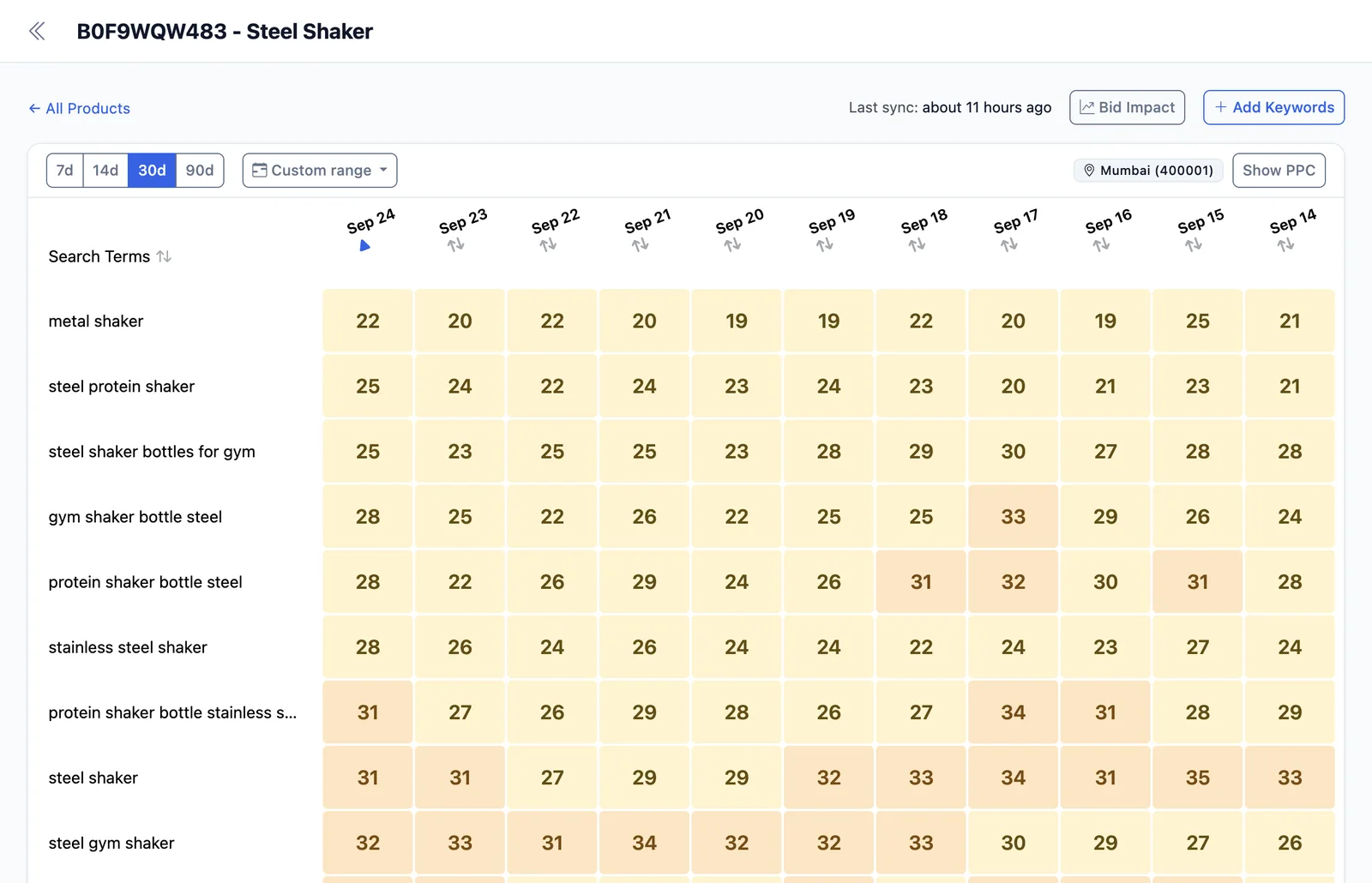
Check two separate questions: where does your product rank, and is it indexed for the keyword? The rank tracker records organic positions and refreshes daily.
The on-demand index checker lets you check selected terms after changes to a title or backend keywords. Together, they help you assess listing visibility without confusing indexing with search position.
Marketing Analytics Amazon Sellers Can Act On
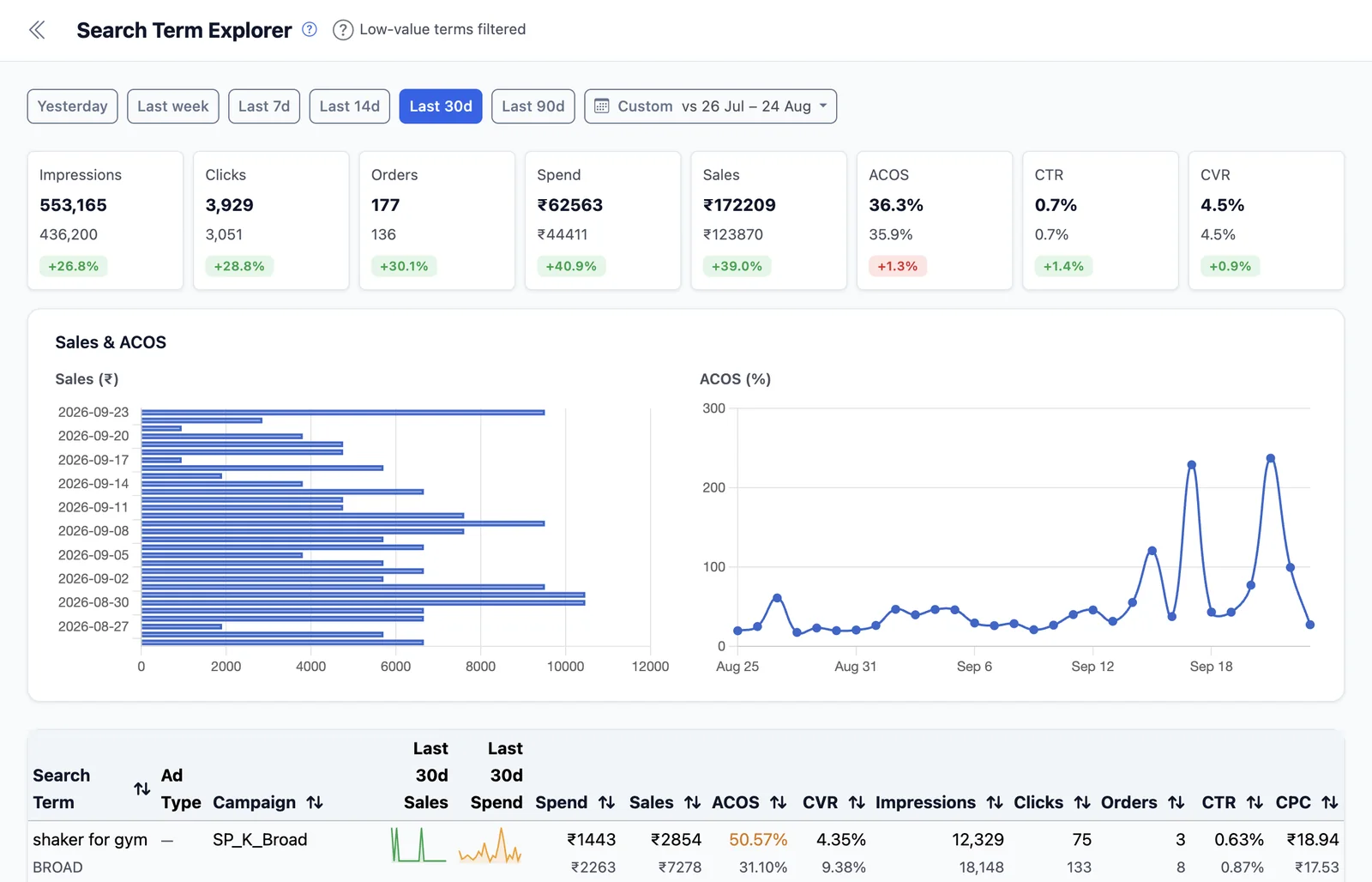
Review ad spend, attributed sales, and ACoS by campaign, target, and search term.
A term's attributed sales matter, but so does the product's margin. EcomDune provides the analysis; you decide whether to change your campaigns.
Amazon Marketplace Analytics for US and India
Our platform supports Amazon US and India and includes GST input credit in its profit view for Indian sellers. Keyword tracking also supports marketplace-specific and pincode-level tracking.
What Refunds Can, and Can't, Tell You
Refunds reduce what you earn. Review their financial impact alongside sales and costs before deciding what requires further examination.
For Amazon customer analytics, distinguish the refund amount from the reason behind it. The amount shows the financial impact; customer feedback can help explain the issue.
Ask Your Numbers a Question
Connect Claude, ChatGPT or Gemini through EcomDune's read-only AI connection. Ask which SKUs lost money last month or compare performance between two periods. Your assistant can read your data but cannot change your account.
When comparing Amazon seller analytics tools, check whether you can review product costs, advertising results and search visibility together.
See What Your Products Earn
Try EcomDune with your existing listings, product costs and advertising data.
The free trial lasts 14 days, requires no credit card and includes tracking for up to 25 keywords. Paid plans start at $19 per month with monthly billing. See pricing.
Common Questions
An Amazon seller dashboard brings the numbers behind your business into one view. EcomDune's shows profit per SKU after advertising, Amazon fees, refunds and product costs, next to organic keyword rank, indexing status and PPC results.
EcomDune supports Amazon US and India. Indian sellers get GST input credit in their profit view, and keyword tracking supports marketplace-specific and pincode-level tracking.
No. EcomDune reads your advertising data without changing bids, budgets or campaigns, and the AI connection for Claude, ChatGPT or Gemini is read-only.
Read-only setup of Seller Central and Ads takes about two minutes. After you upload your product costs, your first per-SKU profit-and-loss view is ready within a day.
Yes. The free trial lasts 14 days, requires no credit card and includes tracking for up to 25 keywords.
See Which Products Earn Money
Profit, rank, indexing and ad results for every SKU, in one dashboard. No credit card required.
Get 14 Days of Free Access