
Free · No login · Nothing you enter is saved
Amazon Sales Estimator: Turn an ASIN Into Monthly Sales
Enter an ASIN, and EcomDune's free Amazon sales estimator shows the listing's Best Sellers Rank and the units and revenue it makes each month.
Run your own listings to see how they compare with nearby competition. You can also enter a competitor's ASIN to see an estimate of how much they are selling.
Reading the listing from Amazon…
Fetching the rank, price and recent-sales tag. This takes a few seconds.
Paste a link, or just the 10-character ASIN from the product page. A link from amazon.com, amazon.in or amazon.ca picks the marketplace for you.
How the Estimate Works
Amazon does not disclose sales figures for other sellers' products. The “bought in past month” tag on a listing is the closest public signal available, and our tool turns that signal into practical revenue estimates.
It is built for brand owners and private-label sellers with live products. Use it to benchmark your listings against the competitors selling beside them.
Our free Amazon sales estimator reads that tag from the live listing in the marketplace you select, and works out units from it. It also shows the listing's Best Sellers Rank and its current price, in that store's currency, which revenue is based on.
Two inputs go in, and four results come out.
| Field | What to enter |
|---|---|
| ASIN or link | The ASIN, or the link to the product page |
| Marketplace | The Amazon store where the listing is sold |
You get the Best Sellers Rank, estimated units per day, estimated units per month, and estimated monthly revenue.
Selling in more than one store? Run each listing separately, using that store's marketplace. A rank from Amazon.in and a rank from Amazon.com are not directly comparable because they sit in different marketplaces and currencies.
To find the BSR, open the product page and look under Product information. It will look something like “#1,240 in Home & Kitchen.” The tool reads it for you, so the ASIN is enough to estimate sales for a listing whose order data you cannot see.
Amazon BSR Calculator: How Rank Relates to Sales
A BSR is a position within a category, not a sales figure. Amazon uses recent sales activity, weighted more heavily than older sales, to order products within a category, so a better rank generally reflects stronger recent demand.
Any BSR calculator starts from one fact: the curve is steep near the top and flatter further down. Moving from #20 to #10 can represent a large jump in daily units. Moving from #90,000 to #80,000 usually represents a much smaller one.
Category also changes the picture. A category with fewer shoppers will usually sell fewer units at the same rank, which is why the tool shows the category next to the rank.
Think of this as an Amazon rank sales calculator: listing in, rank and estimated units out. The quality of the estimate depends on the sales tag behind it.
Use the rank from the main category line. Subcategory ranks come from shorter lists and do not map cleanly to category-wide sales.
Our free tool can also work as a rank calculator Amazon sellers can use before pricing, stock, and advertising decisions.
How to Read the Result
Anchor on the monthly units. Daily units are that figure spread over 30 days, while revenue is calculated by multiplying monthly units by the listing's current price.
For example, if the tool returns 300 units a month, that is roughly 10 units a day. At a $24.99 price, estimated monthly revenue is about $7,500.
The revenue estimate does not account for discounts, coupons or variants priced differently. If a listing runs a coupon, its actual revenue may be lower than the estimate.
A tag is a snapshot, and snapshots can mislead. Check the listing on three different days and use the middle result.
Amazon sales estimator tools see only what the listing shows. They cannot distinguish between a temporary promotion spike and a steady weekly run rate.
Round the result. If the estimate shows 315 units per month, treat it as approximately 300.
What Affects Accuracy
There are four main factors that can pull the actual number away from the estimate.
- Seasonality affects demand. During peak periods, the same rank may represent a larger number of units sold across the category.
- Promotional activity causes spikes. A promotion may improve a listing's rank for a day or two without changing its longer-term run rate.
- Stockouts distort the estimate. If a listing sells out, its rank may fall, making the estimate read low until inventory returns.
- The tag is rounded down. Amazon shows a floor, not a count, so a listing tagged “1K+” can sit anywhere from 1,000 to nearly 2,000, and the real figure is usually higher than the estimate.
Planning Demand for Your Own Listings
Your own sales data is in Seller Central. Use EcomDune's Amazon sales estimator where Seller Central is silent: to estimate sales for the listings around yours.
- Calibrate first. Enter your own ASIN, then compare the estimate with your actual units. If the tool shows 200 units and Seller Central shows 280, the estimate reads about 30% low. Apply that adjustment when you review competitor results in the same category.
- Price the climb. Run your ASIN, then run the listing directly above you. The difference in monthly units shows what moving up one position may be worth. If you sell 150 units a month and the listing above estimates 210, the gap is about 60 units, or roughly $1,500 a month at a $24.99 price.
- Turn revenue into profit. The estimate stops at revenue. What each unit earns after fees, advertising and product costs is a separate calculation. EcomDune's profit analytics shows yours by SKU.
- Keep a log. Record estimates for your top five competitors once a month. Over time, you will see the category's seasonal pattern before it shows up in your own sales.
Done monthly, that routine becomes a simple form of Amazon demand forecasting.
Need to size a whole search page?
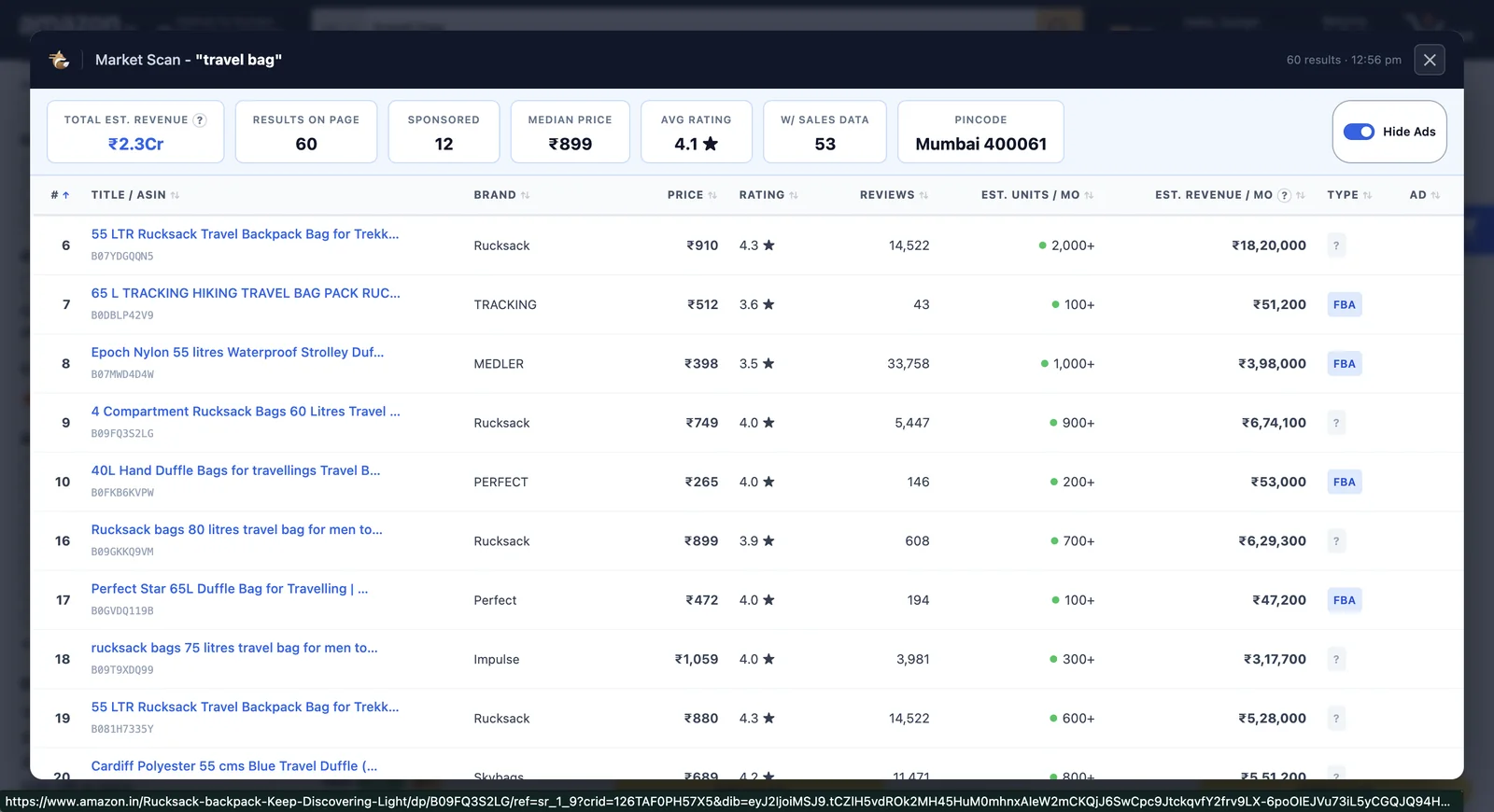
Many Amazon research tools try to answer everything at once. This one is crafted for a single listing. To size every listing on a search results page at once, EcomDune's Market Scan Chrome extension overlays estimated revenue on Amazon search results.
Frequently Asked Questions
No. It is free and does not require a login. Nothing you enter is saved.
You can use it for ASINs that display a "bought in past month" tag. Amazon shows the tag only on listings with enough sales, so brand-new listings may not have one yet. The Best Sellers Rank is still shown when the listing has one.
Each tool uses its own model and data. Two Amazon sales estimator tools can return different estimates for the same listing, so compare ranges rather than treating one figure as exact.
No. This tool reads Best Sellers Rank, which is a category-level position. Where a listing appears for a keyword is a different measure. EcomDune's rank tracker records keyword positions every 24 hours.
For planning, check weekly. Check again before making stock or advertising decisions, and re-run the estimate whenever the rank moves sharply.
Revenue Is Only the Start
The estimate stops at revenue. EcomDune shows what each of your own products keeps after Amazon fees, ads, refunds and product costs, next to its keyword rank and PPC results.
Try EcomDune Free for 14 Days