
Amazon PPC Software That Shows Where Your Ad Spend Is Leaking
ACoS at the account level may look satisfactory; however, individual campaigns can still be spending heavily without producing enough sales. EcomDune provides data from the Amazon Ads API to analyze campaign and keyword performance, identify campaigns with high ACoS, and find areas where ad spending needs closer attention.
Not Just Another Amazon PPC Tool
Online vendors do not require yet another dashboard brimming with statistics. What they need is insight into where their accounts need some help.
While a campaign can generate revenue, it can also be draining company funds. A keyword can be getting many clicks but not enough orders. A search term can continue spending without generating sufficient sales. The main function of our Amazon PPC management software is finding the places where issues arise easily.
Why Account-Level ACoS Conceals Inefficient Campaigns
ACoS is useful for understanding overall advertising efficiency, but the account-level figure does not show how individual campaigns contribute to that result.
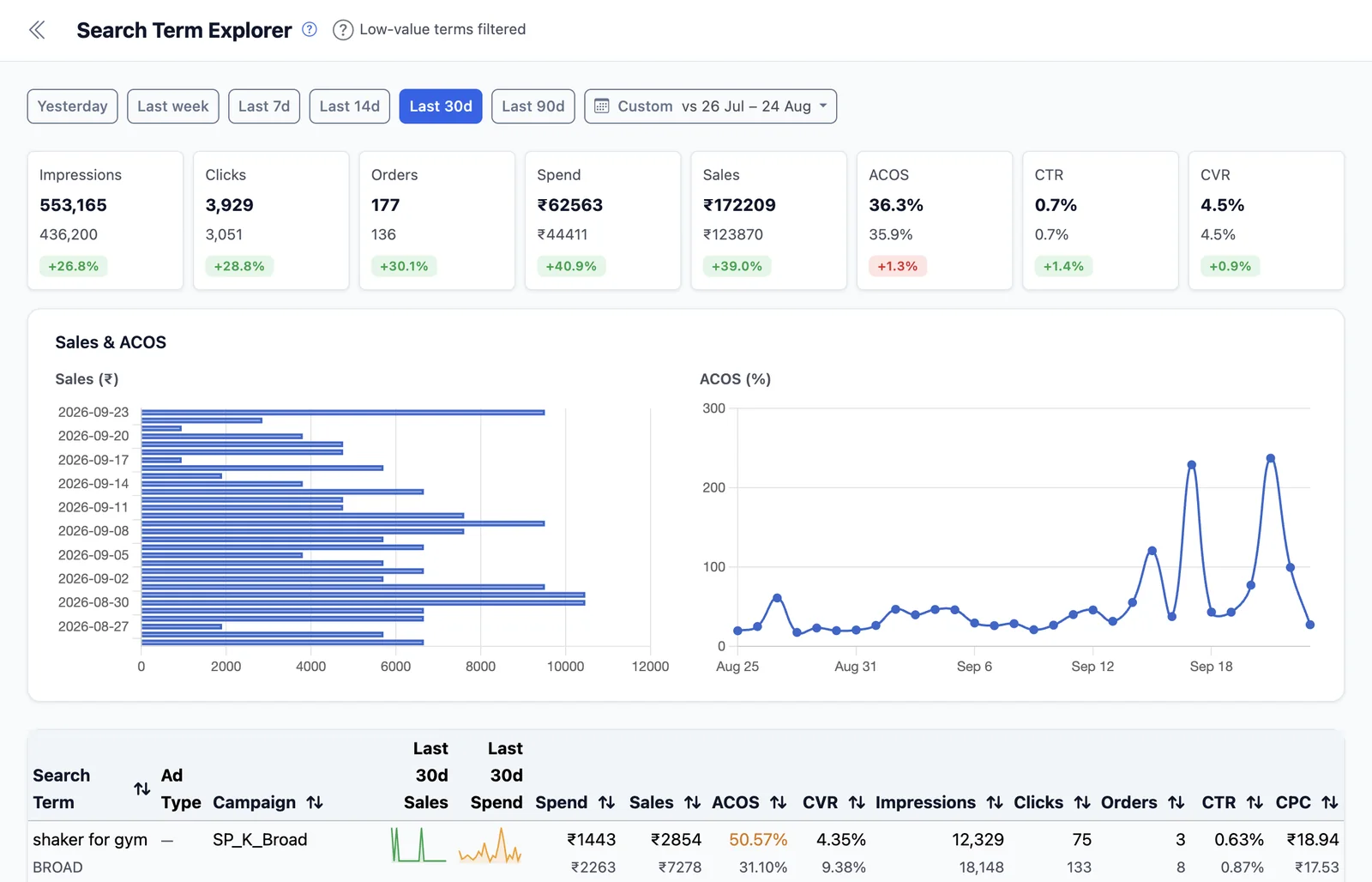
Strong campaign performance can offset weaker results elsewhere, making the overall ACoS look acceptable even when certain campaigns deserve closer attention. This can make it difficult to see which parts of the account are influencing the overall figure. With EcomDune, you can move from the account-level view to more specific PPC data and investigate the campaigns and keywords contributing to your overall results.
This gives you a more useful starting point for making informed PPC decisions.
How Does EcomDune's Amazon PPC Software Work?
Optimizing Your Amazon PPC Campaigns: What You Can Do With EcomDune
When it comes to Amazon PPC optimisation, the first step is to identify the right gap. Altering bids without finding out the reason why your campaign is not doing well will only shift the problem to a different area.
EcomDune makes sure that you check the data beforehand.
Firstly, identify campaigns that show high ACoS or considerable expenditure. Secondly, get down to the keyword level and investigate the potential causes behind the problem.
Search for keywords that are burning your advertising budget without yielding enough sales. Evaluate the performance of these keywords in the context of your overall performance and then decide how to cope with them.
Search-term effectiveness can indicate how your marketing budget is being utilized. Prior to putting any changes into effect, consider the existing data and determine whether a search term generates clicks, revenue, or waste.
Audit Your Amazon PPC Account in One Go
An Amazon PPC audit doesn't have to begin with tons of spreadsheet data exports. EcomDune gives you a single place to review your PPC data and determine where deeper analysis is needed.
Focus your audit on:
- Campaigns that need closer review
- Spending and sales patterns
- Keyword performance
- Search-term performance
- Differences across campaigns
With EcomDune, you can review these areas in one place and use the available data to decide where further investigation is needed.
What Exactly Is Amazon ACoS
The term ACoS stands for advertising cost of sales.
The formula is: ACoS = Ad expenditure / Ad sales × 100
Let's illustrate this with an example.
| Campaign | Ad Spend | Ad Sales | ACoS |
|---|---|---|---|
| Campaign A | $100 | $800 | 12.5% |
| Campaign B | $200 | $200 | 100% |
| Account Total | $300 | $1,000 | 30% |
The overall ACoS in the account is 30%. However, Campaign B has an ACoS of 100%.
That is an important difference. If one only looks at the number at account level, Campaign B may not show in that overall result.
A low ACoS may not always mean a good ACoS depending on the profit of the product, margin, wholesaler fees, and business model. More often than not, there is no one ACoS percentage that may help every Amazon seller.
Amazon likewise notes that there is no single definitive “good” ACoS; the appropriate target depends on factors such as margins and campaign goals.
Getting to Know the Differences Between Amazon PPC Management Software and Amazon PPC Analytics
While Amazon PPC management software can refer to a variety of products, there are different approaches to the field.
Some companies emphasize automation, while others focus on analytics. EcomDune, for example, uses analytics to assess the performance of campaigns.
In the end, it really depends on what you want the software to do for you. If you want to know whether you are spending your advertising money wisely, analytics will help you get started.
Difference Between Amazon PPC Tools: Manual Reports, AdLabs, Nova, and sellerboard
There are various ways through which Amazon sellers can examine and improve PPC performance.
| Alternatives | Features | Most Suitable For |
|---|---|---|
| Manual reports | Sellers can manually extract and analyse Amazon advertising data | Sellers who are proficient in using spreadsheets |
| AdLabs | PPC analytics, bid optimization, keyword harvesting, and negative targeting | Sellers and agencies interested in a controlled optimization process |
| Nova | Amazon advertising analytics covering search terms, campaign performance, spend, sales, ACoS, and profitability | Sellers who want to understand advertising performance and profitability |
| sellerboard | PPC analytics with automated bid optimization and keyword automation | Sellers and companies that need automated PPC analysis |
| EcomDune | PPC analytics using Amazon Ads API data to examine campaign, keyword, and search-term performance | Sellers who need to identify possible reasons for poor PPC performance |
What Data Drives EcomDune Amazon Advertising Analytics?
EcomDune's PPC analytics uses Amazon Ads API data to access advertising performance metrics.
This helps sellers examine potential performance issues at the campaign and keyword levels.
Rather than looking only at account-level data, sellers can take a more detailed look at campaign and keyword performance.
Common Questions
First, analyse campaign performance in your PPC data, then sort or filter campaigns by ACoS and spend. Next, review the keywords and search terms that may be contributing to the result. PPC Analytics from EcomDune allows campaign performance analysis using Amazon Ads API data.
There is no single ACoS goal that is suitable for most sellers. The right target depends on margins, campaign goals, selling price, and other business expenses. ACoS should be considered in terms of profitability.
The most suitable Amazon PPC software depends on what you need it to do. Some tools provide metrics and reports, while others support bid or keyword automation. EcomDune focuses on PPC analytics, which helps sellers analyse campaign performance.
Begin Analyzing the Campaigns That Are Losing You Money
Your total ACoS only gives you a partial story. How do you find the campaigns, keywords, and search terms that need additional attention? Use PPC information to see where your marketing budget is going and make more informed optimization choices.
Start free trial